
Primary question: Does one shared, file-editable memory across Claude Code, Codex, and a built-in agent beat your current per-agent setups?
RepoDaily adoption score
RepoDaily rates this as 92/100 (strong) for adoption: evidence, installation path, production risk, differentiation, license clarity, and AI/agent fit are scored from the article sources and adoption notes.
6 source(s) across 4 source category/categories, plus a RepoDaily-specific evidence module when available.
6 workflow step(s), 6 next-action step(s), and 2 command/install signal(s) were detected.
Trending momentum is +769 stars, with maintenance/release/issue signals counted when present.
Risk is marked medium, with 7 security note(s) and 4 explicit skip condition(s).
3 opportunity lens item(s), 4 alternative(s), and 5 type-specific section(s) support differentiation.
License source or license wording is present.
9 AI/agent-related signal(s) were detected in the article text and metadata.
Project overview
holaOS introduces itself as 'The Computer for You and Your Agent': a local-first Electron desktop workspace where Claude Code, Codex, and the built-in holaOS agent run side by side over the same tools, files, and one shared memory. The core pitch is agent portability — whichever agent drives a session, it inherits the same memory, tools, skills, and apps, so swapping runtimes costs no rebuild of your setup. Frontier models ship built in, or you bring your own keys. Platforms cover macOS (Apple Silicon and Intel), Windows, and Linux.
The traction numbers for 2026-08-15 put it at #7 on GitHub trending with 769 stars in the period, and the README carries Trendshift daily badges next to a CI badge for its ci.yml pipeline. What separates it from chat-style desktops is the memory model: context, preferences, and project history live in a single shared memory stored locally as plain files you can read and edit — 'Never start from zero,' as the README puts it. The repository description adds 100+ integrations plus MCP support across tools, apps, browser, and files.
The trade-offs sit in the LICENSE file and the repo layout rather than the feature list. holaOS uses a Modified Apache 2.0: internal use within a single organization — including multiple workspaces — needs no commercial license, but offering holaOS as a hosted service or embedding it in a distributed product does, unless Holaboss authorizes it in writing. The code itself is a Bun-and-Turborepo monorepo (package hola-boss-oss, [email protected] pinned, private:true) with a runtime layer split across four named packages — a real architecture, not a wrapper around one vendor's API.
Why it is trending now
- 769 stars on 2026-08-15 and #7 on GitHub trending, with Trendshift daily badges embedded in the README.
- Agent-neutral positioning: the README leads with running Claude Code, Codex, or holaOS in one workspace, and 'no lock-in' is a headline bullet.
- Shared memory stored locally as plain files hits the portability nerve: readable, editable, and persistent across app restarts and agent swaps.
- 100+ integrations plus MCP in a single desktop app, per the repository description — one connection layer for every agent.
- TypeScript and Electron match where agent-tool builders already work; the ci.yml CI badge signals automated checks on every push.
Problem it solves
- Every agent keeps its own context; moving from Claude Code to Codex means re-explaining the project and re-authorizing tools.
- Vendor-cloud memory cannot be audited, hand-edited, or carried to another agent when you switch.
- MCP servers, file access, and browser tools are typically configured per agent, so the same integration gets wired twice.
- Terminal agents lack a shared surface for apps and files; desktop chat apps lack agent runtimes. The two worlds stayed separate.
How it works
- Install the Electron desktop app on macOS (Apple Silicon or Intel), Windows, or Linux — or build from source with Bun.
- Pick a model source: frontier models built in, or bring your own keys.
- Launch agents — Claude Code, Codex, or the built-in holaOS agent — inside one workspace; all of them draw on the same memory, tools, skills, and apps.
- Context, preferences, and project history accumulate in one shared memory stored locally as plain files you can open and edit.
- Close the app or switch agents; the shared memory carries state forward instead of starting cold.
- Extend the surface through 100+ integrations and MCP servers attached to the shared tool layer, not to individual agents.
Product demo and interface preview
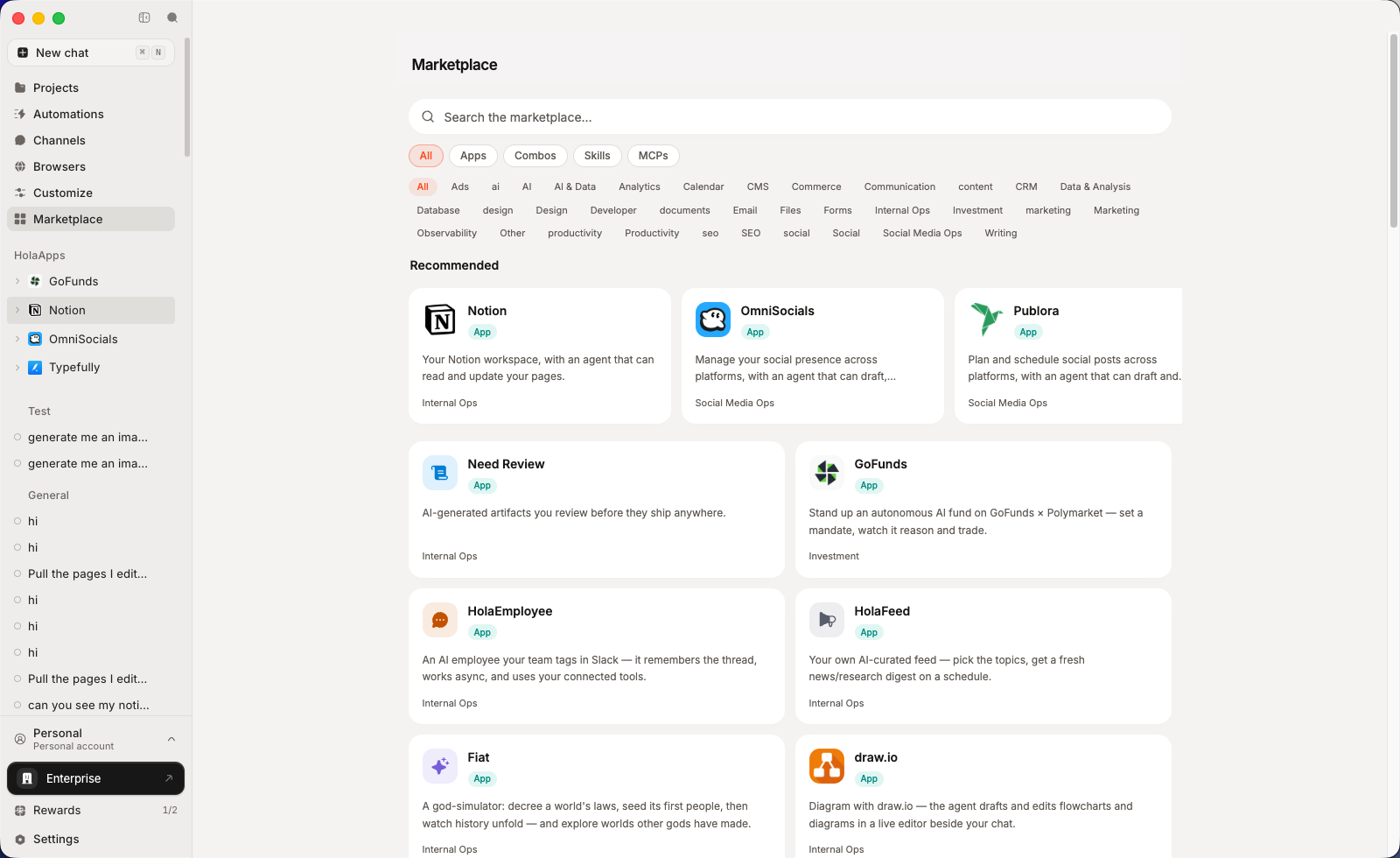
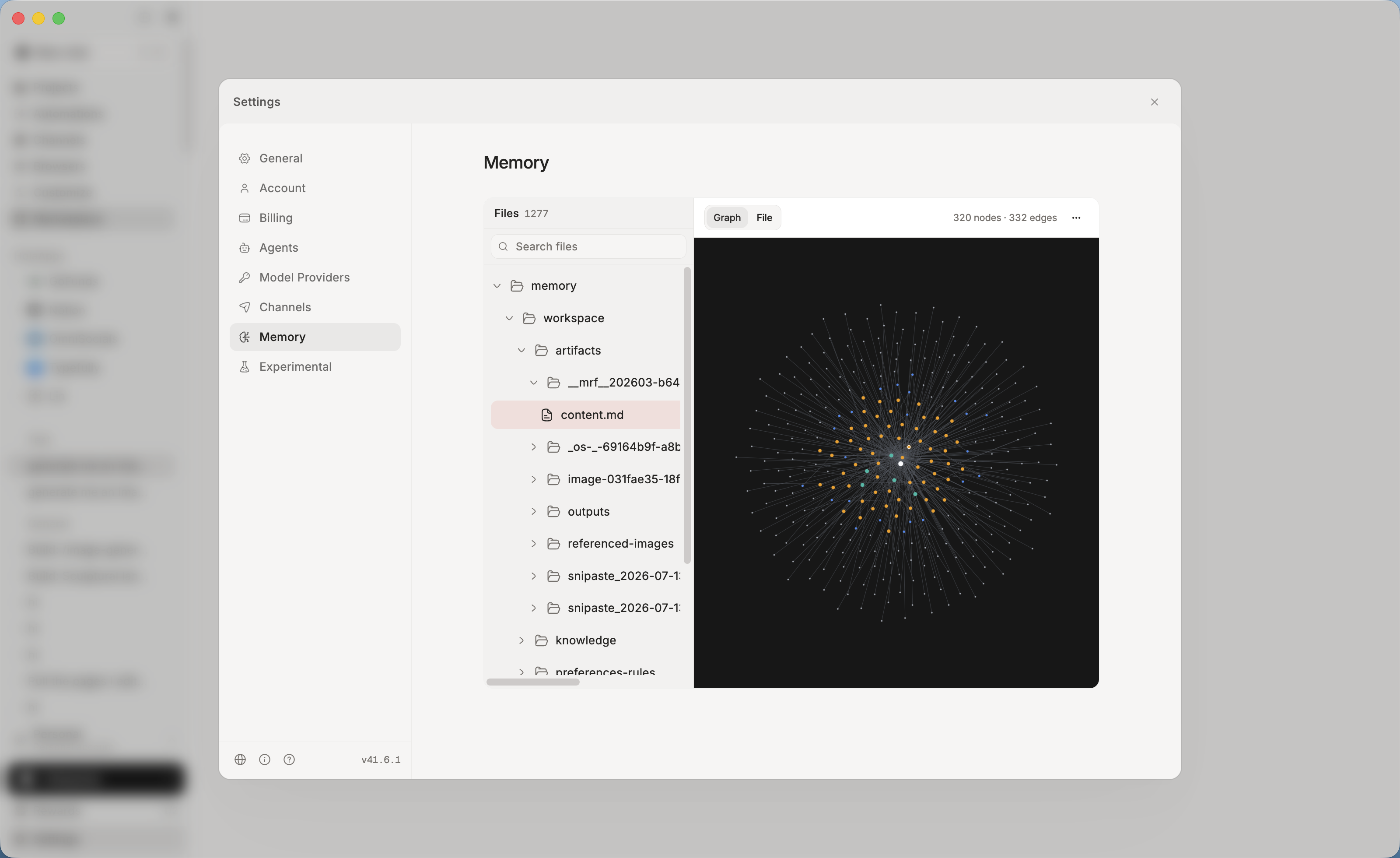
Architecture read: one desktop shell over a four-part runtime
package.json names the workspace hola-boss-oss and pins [email protected] as the package manager, with Turborepo (^2.9.18) orchestrating build, test, typecheck, and lint across packages. The runtime splits into @holaboss/runtime-harness-host, @holaboss/runtime-harnesses, @holaboss/runtime-state-store, and @holaboss/runtime-api-server — a layout where harnesses (the agents) are hosted by a host process, state sits in its own store, and an API server fronts the stack. SECURITY.md describes the supported scope as 'the OSS desktop workspace and runtime stack,' confirming the two-layer design.
The desktop app lives under apps/desktop, and an @holaboss/app-sdk exists for building apps that run inside the workspace. Native code is in the build path: trustedDependencies lists @electron/rebuild, @parcel/watcher, and better-sqlite3, and runtime:rebuild-sqlite runs scripts/ensure-native-sqlite.mjs to rebuild the SQLite native module when toolchains mismatch.
Command surface: what the scripts reveal
- `bun run dev` calls desktop:dev, which runs the holaboss-local app with `--elide-lines=0`.
- `desktop:dev:isolated` and `desktop:e2e` cover isolated runs and end-to-end tests.
- `memory:cleanup` and `memory:eval` drive scripts/memory-cleanup.mjs and scripts/memory-eval.mjs to manage and measure the shared memory.
- `runtime:start:isolated` starts the runtime in isolation; `runtime:start:evals` adds `--namespace evals --default-name memory-evals`.
- `runtime:test` chains tests across runtime-state-store, runtime-harnesses, runtime-harness-host, and runtime-api-server.
- `runtime:logs` (scripts/runtime-logs.sh) surfaces runtime output; `sdk:app-sdk:codegen` generates SDK code.
- `desktop:dist:mac:local` and `desktop:dist:win:local` build local distributions — the pack shows no Linux dist script.
Integration surface
- Three agent types on day one: Claude Code, Codex, and the built-in holaOS agent, all sharing one memory, one tool set, one workspace.
- 100+ integrations plus MCP, per the repository description — tool connections attach to the workspace, not to each agent.
- Files, apps, and browser access run through the same Electron shell, per the README badges and description.
- Shared memory is stored locally as plain files, readable and editable outside the app.
- The @holaboss/app-sdk (built by desktop:prepare) is the hook for in-workspace apps; `sdk:app-sdk:codegen` generates its types.
Try-it path
- Start at the docs linked from the README nav: holaos.ai/docs/getting-started.
- From source: `bun install` (desktop:install), then `bun run desktop:prepare` to build @holaboss/app-sdk, then `bun run dev`.
- Configure a model at first launch — built-in frontier models or BYOK, per the README.
- Run the same prompt through Claude Code and the built-in agent in one workspace; watch the shared memory accumulate.
- Quit the app, reopen it, and confirm the agents still know where you left off; open the plain-file memory on disk while you are there.
- Budget an hour for the desktop path, plus extra time for native rebuilds if better-sqlite3 trips on your toolchain (`runtime:rebuild-sqlite`).
Maintenance and license risk
The Modified Apache 2.0 carries three conditions that matter operationally. First, a hosted or embedded service — SaaS, a managed service, or holaOS inside a sold product — requires a commercial license from Holaboss unless authorized in writing; internal use within a single organization, including multiple workspaces, does not. Second, the frontend (the desktop/ directory when running from source, or the packaged desktop app) must keep the logo and copyright information intact. Third, contributors agree the producer may adjust the agreement stricter or looser and may use contributions commercially, including cloud operations.
Repo-level signals add caution: package.json is private:true, so there is no npm publishing path; Bun is pinned at 1.3.6; and the pack contains no release notes or changelog to pin against. Copyright reads 2026 Holaboss — the project is young, and version discipline is currently on you.
Who should pay attention?
Good fit if
- Developers alternating between Claude Code and Codex who re-explain context on every swap.
- Anyone who wants agent memory as auditable local files rather than vendor-cloud state.
- Internal, single-organization rollouts of one agent desktop across macOS, Windows, and Linux.
- Builders of MCP servers who want one client surface serving several agents.
- Privacy-first users choosing BYOK over built-in model access.
Skip for now if
- Anyone planning to host holaOS as a paid service or embed it in a shipped product without a commercial license from Holaboss.
- Projects needing a headless, server-side agent runtime today — this is an Electron desktop app.
- Environments that cannot run the pinned Bun 1.3.6 toolchain or native modules like better-sqlite3.
- Anyone requiring published packages, semver releases, or a changelog — none appear in the pack.
Risks and cautions
Internal use is clearly permitted and the memory model is transparent, but the modified license restricts commercial hosting, lets the producer change terms, and the repository ships no releases or changelog in the pack.
- LICENSE condition 1a blocks hosted or embedded third-party service without a written commercial license.
- Contributor terms let Holaboss tighten or relax the agreement later and reuse contributed code commercially.
- No releases, changelog, or version tags appear in the pack; copyright starts 2026.
- Frontend redistribution must retain logo and copyright in the desktop/ directory or packaged app.
- The [email protected] pin and native trustedDependencies add build-environment constraints.
- SECURITY.md scopes security support to 'the OSS desktop workspace and runtime stack.'
- Sensitive classes listed: credential/token/secret exposure, remote code execution, sandbox escape or privilege escalation, auth bypass, and unsafe default configuration exposing a local runtime or user data.
- Reports go privately to [email protected] — public GitHub issues are explicitly discouraged; include the affected commit or release, reproduction steps, and impact.
- Maintainers ask for reasonable time to validate and fix before public disclosure.
- The stack runs a local API server (@holaboss/runtime-api-server) and state store; the 'unsafe default configuration' clause shows the maintainers track that surface.
- Memory is plain local files — convenient to audit, but any process with filesystem access can read it.
- trustedDependencies includes native packages (@electron/rebuild, @parcel/watcher, better-sqlite3) that run build scripts — pin and review on update.
Alternatives to compare
| Approach | When to use | Trade-off |
|---|---|---|
| You want a single open-source terminal coding agent rather than a desktop harness hosting several | Open source; you pay OpenAI API usage | |
Claude Code | You are committed to one vendor's agent and do not need cross-agent shared memory | Vendor subscription or API usage |
Jan | You want a local-first desktop app for running models privately, without the multi-agent runtime | Free and open source; local models or your own provider keys |
AnythingLLM | You mainly need per-workspace document chat with local or cloud models, not an agent runtime | Free and open source; local or cloud models |
What this trend reveals
Agent-agnostic harness as a layer
The package names @holaboss/runtime-harness-host and @holaboss/runtime-harnesses indicate harnesses are a first-class layer, with Claude Code and Codex as swappable tenants over shared state.
Run the same task through two agents in one workspace and diff the results and memory writes against your separate setups.
File-based memory as a portable format
README states memory is stored locally as plain files you can read and edit, and the repo ships memory:eval plus runtime:start:evals with `--namespace evals` to measure it.
Inspect the memory files between sessions, hand-edit one, and confirm agent behavior changes on the next run.
Internal deployment without a commercial license
LICENSE condition 1a explicitly exempts internal use within a single organization, including multiple workspaces, from the commercial-license requirement.
Read LICENSE before any team-wide rollout and confirm the internal/external boundary with legal if agents would serve outside users.
RepoDaily verdict
holaOS bets that the agent is replaceable and the workspace is not: one local desktop, one file-based memory, any agent on top. For internal, single-organization use the Modified Apache 2.0 is workable; for anyone eyeing hosted products, the license — not the tech — decides. Rank #7 with 769 stars says the bet is landing.