
Primary question: Does an LLM-script, matched-footage, MoviePy pipeline produce clips you would actually publish after a light edit?
RepoDaily adoption score
RepoDaily rates this as 91/100 (strong) for adoption: evidence, installation path, production risk, differentiation, license clarity, and AI/agent fit are scored from the article sources and adoption notes.
6 source(s) across 4 source category/categories, plus a RepoDaily-specific evidence module when available.
6 workflow step(s), 5 next-action step(s), and 7 command/install signal(s) were detected.
Trending momentum is +494 stars, with maintenance/release/issue signals counted when present.
Risk is marked medium, with 5 security note(s) and 4 explicit skip condition(s).
3 opportunity lens item(s), 4 alternative(s), and 5 type-specific section(s) support differentiation.
License source or license wording is present.
7 AI/agent-related signal(s) were detected in the article text and metadata.
Project overview
MoneyPrinterTurbo sits at rank 5 on this period's GitHub trending list with 494 new stars, and its pitch is unusually narrow: give it a topic or a keyword, and it writes the video script, matches material to each scene, generates subtitles and background music, and composes the result into an HD short video. Version 1.3.4, declared in pyproject.toml, requires Python 3.11 or newer and runs on Windows, macOS and Linux per the README's platform badge. The MIT license (Copyright 2024 Harry) puts no restriction on commercial reuse of the code itself.
What makes this an infrastructure-style pick rather than a hosted-SaaS clone is the deployment shape. The docker-compose.yml defines two services built from one image: webui, which launches `streamlit run ./webui/Main.py` and is published on 127.0.0.1:8501, and api, which runs `python3 main.py` on FastAPI and uvicorn and listens on 127.0.0.1:8080. The Dockerfile builds from python:3.11-slim-bullseye, installs exactly git and ffmpeg at the OS layer, and EXPOSEs 8501. Both services share a volume mount of the repository root, so config.toml, the storage directory and every render live on the host.
The dependency list reads like a deliberate pipeline rather than an accumulation. moviepy==2.2.1 handles composition; edge-tts==7.2.7 and azure-cognitiveservices-speech==1.41.1 cover voice; faster-whisper==1.1.0 aligns subtitles; and four provider SDKs — openai==2.24.0, dashscope==1.20.14, litellm==1.86.2 and google-genai==2.11.0 — cover the script layer. redis==5.2.0 is pinned for state, loguru==0.7.3 for logging. Every version is exact-pinned and the runtime is frozen further by uv.lock, which the pyproject comments call out explicitly as the way to keep different machines from resolving different versions.
There are also engineering-hygiene signals rare in this category: a dev group with pytest==9.1.1, ruff==0.15.21 and coverage==7.15.1, plus branch coverage configured with fail_under = 70 across app, cli, webui, main and docs/skill, with a comment citing measured branch coverage above 70.4% on both Python 3.11 and 3.13. The pyproject description also mentions prompts, local assets, subtitles and TTS — meaning you are not limited to remote material. The README documents a sponsor integration in which Moonshot's Kimi K3 writes the copy, extracts the material-search keywords and decides which footage appears, which is an honest map of where quality actually comes from in this kind of pipeline.
Why it is trending now
- 494 stars this period at trending rank 5, on a bilingual README that puts the WebUI and API screenshots up front.
- The one-input promise — topic or keyword in, subtitled HD video out — collapses a five-tool content pipeline into a single self-hosted service.
- Version 1.3.4 with exact-pinned dependencies plus uv.lock answers the first question operators ask about AI side projects.
- Four LLM provider SDKs (openai, dashscope, litellm, google-genai) and an optional TwelveLabs extra mean it is not hard-wired to one vendor.
- Docker-first delivery with loopback-only port bindings makes the demo one command away without putting an unauthenticated UI on the LAN.
Problem it solves
- Producing a consistent short video normally crosses five handoffs: script, stock-footage search, TTS, subtitle timing and editing.
- Hosted AI video services bill per render and cap volume; here the API surface runs on your own Docker host with your own keys.
- Volume content needs a programmatic entry point, not a browser tab — which is exactly what the FastAPI service on 8080 provides.
- Subtitle and voice drift is the classic failure of quick pipelines; faster-whisper alignment is built in rather than bolted on.
How it works
- Install: build with `docker build -t moneyprinterturbo .` on the python:3.11-slim-bullseye base that adds git and ffmpeg, or let `docker compose up` build both services at once.
- Configure: bind-mount config.toml and a storage directory — the documented run command is `docker run -v $(pwd)/config.toml:/MoneyPrinterTurbo/config.toml -v $(pwd)/storage:/MoneyPrinterTurbo/storage -p 127.0.0.1:8501:8501 moneyprinterturbo`.
- Prompt: enter a topic or keyword in the Streamlit UI at 127.0.0.1:8501; the script layer drafts copy and scene terms through the openai, dashscope, litellm or google-genai SDKs.
- Gather: material is matched per scene — per the README's Kimi section, the model both extracts the search keywords and decides which clips appear; local assets are also supported per the pyproject description.
- Render: moviepy==2.2.1 composes the cut, edge-tts or Azure Speech generates narration, faster-whisper==1.1.0 aligns subtitles, and background music is added per the README's feature list.
- Automate: skip the UI and drive `python3 main.py` — the api service on 127.0.0.1:8080 — for batch renders, with redis==5.2.0 backing state.
Product demo and interface preview
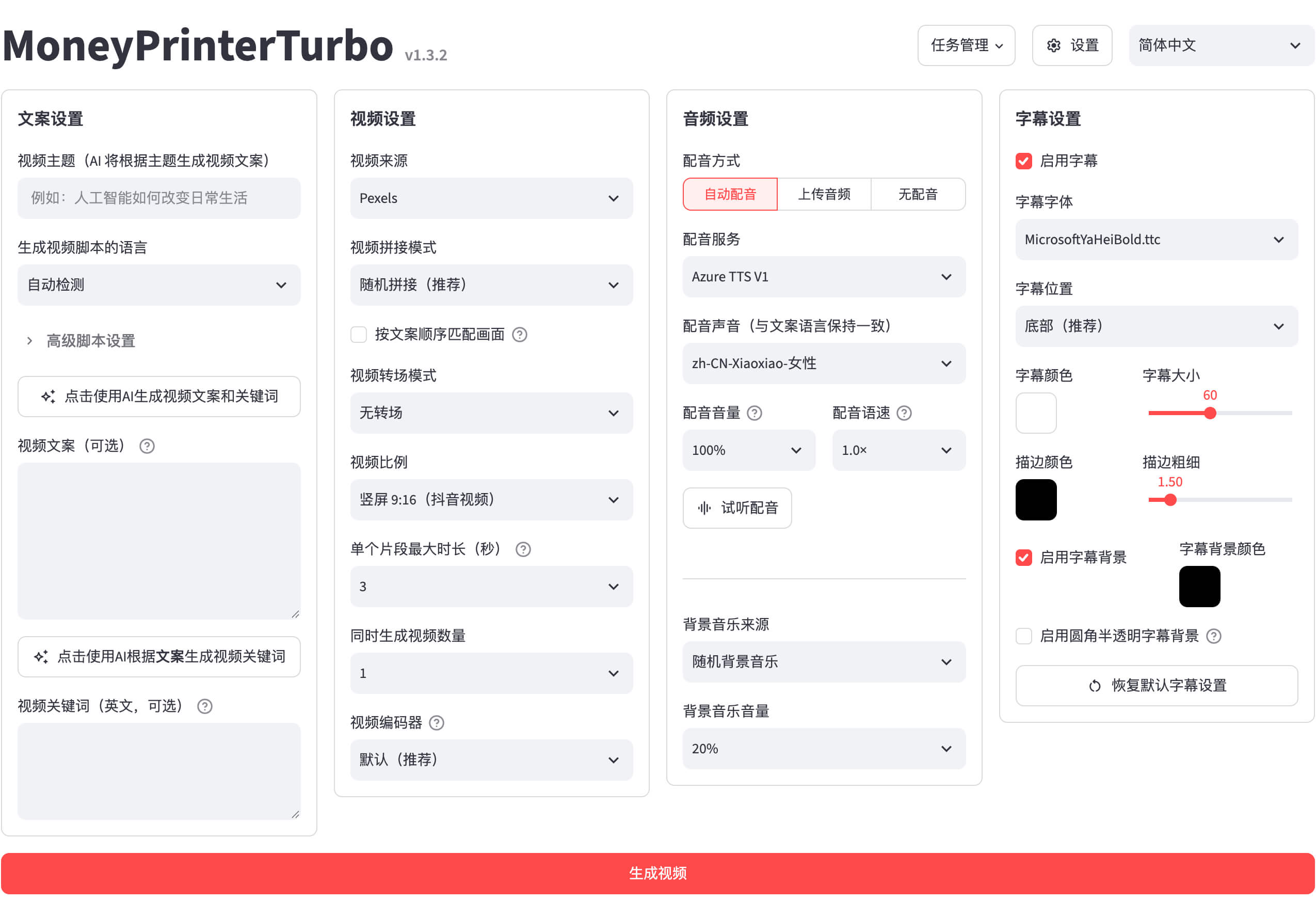
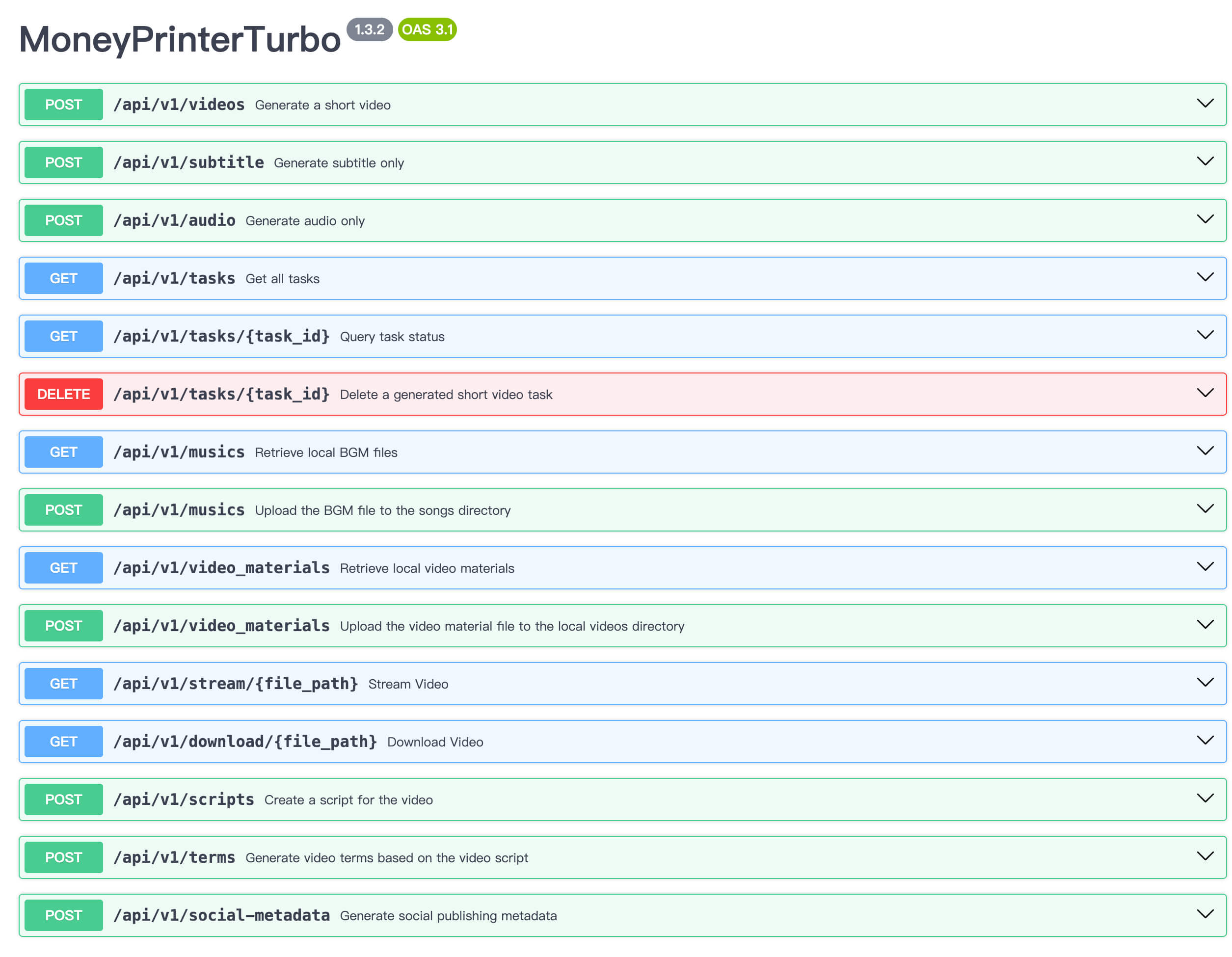
Architecture read: what the dependency graph tells you
- Entry surfaces: webui/Main.py (Streamlit), main.py (FastAPI + uvicorn), plus cli and docs/skill scripts that the coverage config lists alongside app as production entry points.
- Composition layer: moviepy==2.2.1 is the only video-editing dependency — no ffmpeg-python or OpenCV beside it; ffmpeg itself comes from the image's apt layer.
- Speech: two independent TTS routes, edge-tts==7.2.7 and azure-cognitiveservices-speech==1.41.1, with pydub==0.25.1 for audio handling.
- Script layer: openai==2.24.0, dashscope==1.20.14, litellm==1.86.2, google-genai==2.11.0 — four SDKs, all exact-pinned.
- State and logging: redis==5.2.0 is a first-class dependency and loguru==0.7.3 handles logs; no queue library like Celery appears in the dependency list.
- Packaging: hatchling build backend but `[tool.uv] package = false` — it runs as an application, not a pip-installable library.
Try-it path: from clone to first render
- Clone the repo, then `docker compose up` — two containers start: moneyprinterturbo-webui on 127.0.0.1:8501 and moneyprinterturbo-api on 127.0.0.1:8080, both with restart: always.
- Or use the single-container route from the Dockerfile comments: build the image, mount config.toml and storage, and map 127.0.0.1:8501:8501.
- Put provider keys into config.toml before the first render; the file is bind-mounted, so host-side edits reach the container without a rebuild.
- Open http://127.0.0.1:8501, enter one keyword, and target a 30–60 second clip for the first pass.
- Afterwards, inspect the mounted storage directory for the script, matched material and the final MP4 to judge how much editing remains.
- Non-Docker route: requires Python 3.11+ and ffmpeg present locally; uv.lock pins the environment per the pyproject comments.
Deployment notes: the loopback detail that matters
- docker-compose.yml publishes webui as 127.0.0.1:8501:8501 and api as 127.0.0.1:8080:8080 — neither service is reachable off-host unless you change the mapping.
- The Dockerfile comments are explicit that the container must listen on 0.0.0.0 while the host mapping stays 127.0.0.1, and that `browser.serverAddress` only affects the displayed URL.
- Default builds use Chinese mirrors (Aliyun apt and pip, with Tsinghua and then stock Debian fallbacks); GitHub Actions builds for the GHCR image set PIP_USE_OFFICIAL=1 instead.
- The compose file mounts the whole repository root (`./:/MoneyPrinterTurbo`) into both containers, so code, config and output share one path.
- The image runs `chmod 777 /MoneyPrinterTurbo` on its working directory — a loosened default to note when hardening.
- apt installs retry three times and cascade across mirrors, which helps on flaky networks but lengthens build logs; EXPOSE 8501 documents the WebUI port while 8080 is defined in compose.
Integration surface: what you plug in
- Script generation: four provider SDKs in core dependencies — openai, dashscope (Alibaba), google-genai, and litellm as a multi-provider router.
- Voice: edge-tts and Azure Cognitive Services Speech, with azure-cognitiveservices-speech==1.41.1 pinned.
- Optional: TwelveLabs video-understanding/embedding via `uv sync --extra twelvelabs` (twelvelabs>=1.2.8), only needed when twelvelabs_api_keys is configured.
- Sponsor integration: the README describes Kimi K3 driving copy, search keywords and footage choice, with a promotion granting 10% extra API credit (up to ¥1000) on first top-up through 2026-09-30.
- State: redis==5.2.0 — point it at an existing instance or run one alongside the compose stack.
- Inputs and outputs are ordinary files: prompts and local assets in, renders written to the mounted storage directory that downstream publishing can watch.
Maintenance read: signals and single points
- Version 1.3.4 with every runtime dependency exact-pinned and uv.lock freezing resolution — upgrades become deliberate acts.
- Coverage is enforced, not aspirational: branch coverage across app, cli, webui, main and docs/skill with fail_under = 70, justified by measured results above 70.4% on Python 3.11 and 3.13.
- Dev tooling includes ruff==0.15.21 and pytest==9.1.1; a per-file E402 ignore for webui/Main.py documents a known import-order quirk.
- The README links to GitHub Releases, but this source pack contains no release notes, so recent change velocity is unverified here.
- Copyright is a single holder (Harry, 2024) under MIT — no CLA, contributor agreement or organization appears in the pack.
- Cost and availability sit with external providers; a provider outage or price change degrades renders even when the code itself is healthy.
Who should pay attention?
Good fit if
- Solo creators and two-person channels publishing volume drafts to TikTok or Shorts who will still edit before posting.
- Self-hosters comfortable with the Docker path and with managing provider keys in config.toml.
- Automation builders who need an HTTP surface — the api service exists precisely for programmatic renders.
- Groups standardizing on multiple LLM vendors through the four pinned SDKs.
Skip for now if
- Projects needing exclusive or original footage — material is matched from external sources by design, though local assets are supported.
- Anyone without Python 3.11+, Docker or ffmpeg, or unwilling to obtain LLM and TTS keys.
- Organizations requiring vendor support or an SLA — MIT code under a single copyright holder offers neither.
- High-assurance needs: this source pack includes no security policy or audit document to lean on.
Risks and cautions
The code side is unusually tidy for the category — pinned dependencies, uv.lock, an enforced 70% branch-coverage floor — but output quality, cost and availability depend on external LLM, TTS and material providers, and maintenance centers on one copyright holder.
- Exact-pinned dependencies plus uv.lock remove version drift, the most common breakage mode for AI side projects.
- Enforced branch coverage (fail_under = 70) across app, cli, webui, main and docs/skill signals tests are treated as a release gate.
- Four LLM SDKs and two TTS engines spread provider risk, yet every render still consumes paid external APIs.
- MIT under a single 2024 copyright holder (Harry) means bus-factor risk without organizational backing.
- The compose file mounts the repository root into both containers, so careless host permissions widen what a compromised process could write.
- Both services bind to 127.0.0.1 in docker-compose.yml (8501 and 8080), keeping the unauthenticated UI and API off the network by default.
- The Dockerfile comments warn that `browser.serverAddress` is display-only; switching the host port mapping to 0.0.0.0 exposes Streamlit and FastAPI, and no authentication mechanism appears in this source pack.
- config.toml carries provider API keys and is bind-mounted from the host — keep it out of version control and restrict its file permissions.
- The compose volume mounts the entire repository root into both containers, and the image sets `chmod 777 /MoneyPrinterTurbo` — two defaults worth tightening in production.
- No SECURITY.md, threat model or audit document appears in this source pack; rights to matched footage and music remain the operator's responsibility.
Alternatives to compare
| Approach | When to use | Trade-off |
|---|---|---|
FujiwaraChoki/MoneyPrinter | You want to compare against the original open-source MoneyPrinter that named this category of one-click video generation. | Open source |
RayVentura/ShortGPT | You prefer a library-first Python framework for automating short-form video rather than a full app with WebUI and API services. | Open source |
| You want deterministic, code-driven video in React with full layout control instead of LLM-matched material. | Free for individuals and small teams; paid license for companies | |
Managed rendering APIs (e.g. JSON2Video, Creatomate) | You want rendering as a billed, supported API with no containers or dependency pins to maintain. | Usage-based paid SaaS |
What this trend reveals
Batch a niche channel through the API service
The api service (`python3 main.py` on 127.0.0.1:8080) turns the WebUI into a callable renderer; a channel operator can queue keyword lists instead of typing them one by one.
Render 20 clips across a single niche through the API, then measure how many survive editing unchanged — that ratio decides whether batching pays off.
Provider cost arbitrage on the script layer
With openai, dashscope, litellm and google-genai SDKs all pinned in core dependencies, the script writer is swappable per project without touching the render stack.
Generate the same topic with two configured providers and score the scripts blind, then compare against token pricing at your expected render volume.
Agent-driven use via docs/skill
The coverage config lists docs/skill as a production entry point, described in the pyproject comments as skill scripts published for agent users — the repo already anticipates being driven programmatically by agents.
Read the scripts under docs/skill in the repository and run one against a throwaway API key before granting broader file-write access.
RepoDaily verdict
MoneyPrinterTurbo earns its 494-star week on execution rather than novelty: version 1.3.4 pins every dependency, freezes the runtime in uv.lock, enforces a 70% branch-coverage floor, and ships a compose file that keeps both services on loopback. What it cannot pin is quality — script and footage come from the LLM and stock sources you pay for. Treat it as a draft factory you audit per clip, and the trade is favorable.